Subscription packages
A subscription package is a prepaid billing method. You can purchase a package in the Agora Console to cover Signaling usage for the current month.
This page explains how to purchase, and manage subscription packages.
Purchase and upgrade
By default, a new account is assigned the Free package when the first project is created. You can upgrade at any time to the Lite, Starter, Pro, Business, or Enterprise. Higher-tier packages provide greater discounts. To upgrade:
- Log in to Agora Console.
- In the sidebar, click Subscriptions.
- Under All Subscriptions, click Signaling > Upgrade Plan.
- Select your package and click Subscribe.
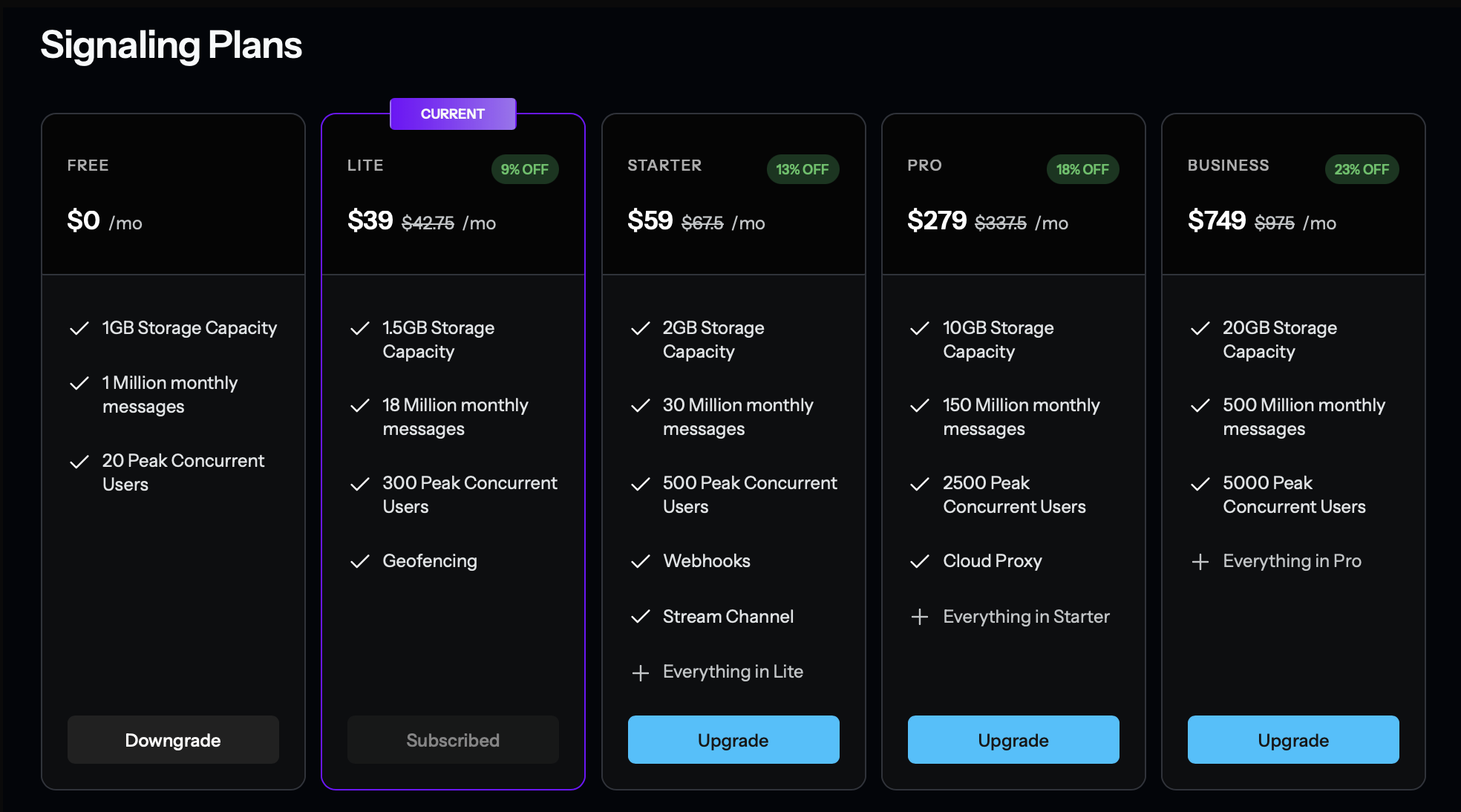
- If you are a non-contracted customer, all packages, except the Enterprise package can be purchased directly from the Agora Console. To upgrade to the Enterprise package, contact Agora sales.
- You can upgrade sequentially or skip levels. For example, you may upgrade from Starter to Business directly.
- Package upgrades take effect immediately and apply to the entire calendar month. If you make multiple upgrades on the same day, only the last upgrade is applied.
- If your account has a negative balance, purchasing a prepaid package first charges your credit card for the outstanding balance, then for the package fee.
Upgrade rules
When you upgrade to a paid package, it becomes effective for the entire calendar month, regardless of the purchase date. You receive the full monthly allocation included in the selected package. The cost of the previous package is deducted from the new package price, so you only pay the difference. If you request an upgrade after auto-renewal has triggered, you may upgrade for the next month as well.
Renewal
By default, your subscription package renews automatically 48 hours before it expires. Ensure your account has sufficient balance or enable auto-pay to avoid renewal failure. You can unsubscribe at any time to prevent renewal. See Cancel subscription.
If renewal fails:
- The system sends a notification and retries the renewal.
- If renewal still fails by the time the package expires, the package downgrades to the Free package.
- To restore the previous package, see Purchase and Upgrade.
Downgrade
You can downgrade by selecting and purchasing a lower-tier package. A downgrade takes effect when your current package expires if you request it before auto-renewal is triggered. You are charged for the new package when you request the downgrade.
You can downgrade only once per month.
-
If your downgrade for the next month is successful, auto-renewal for the current package is not triggered.
-
If a package is already active, you must wait until the 1st day of that month to initiate a downgrade for the following month.
Example
- Requested more than 48 hours before the current package expires: The downgrade takes effect after the current package expires.
- Requested less than 48 hours before the current package expires: Since a package is already active for the next month, you must wait until the new package starts to downgrade for the following month.
Cancel subscription
To cancel a prepaid package, downgrade to the Free package. Downgrade rules apply.
Free tier overage
For Free tier users, exceeding the included free tier quota results in service suspension. Service resumes when you upgrade to a prepaid subscription package.